<Game of Thrones: Kingsroad> PC Version
Check out Game of Thrones: Kingsroad on PC!
How to play the PC Version
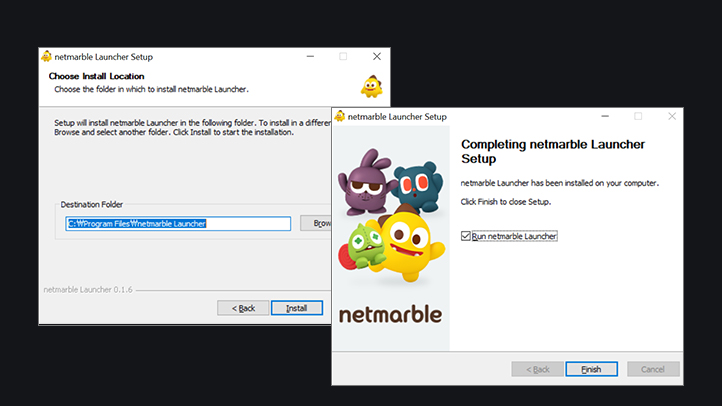
Run the .exe file to install the Netmarble Launcher, then run it.
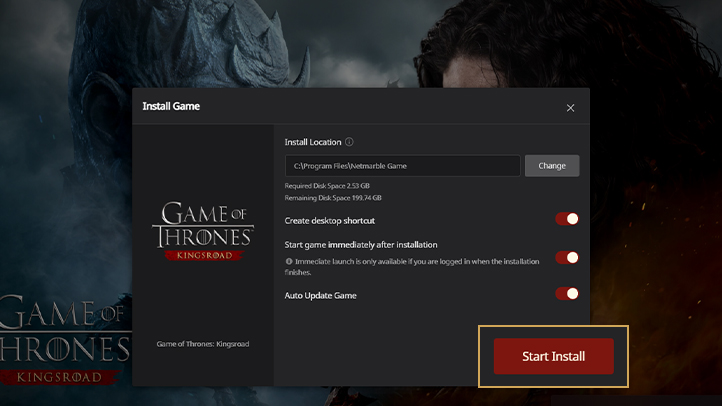
After opening the Netmarble Launcher, go to the Game of Thrones: Kingsroad game installation pop-up, check your installation settings, then click "Start Install".
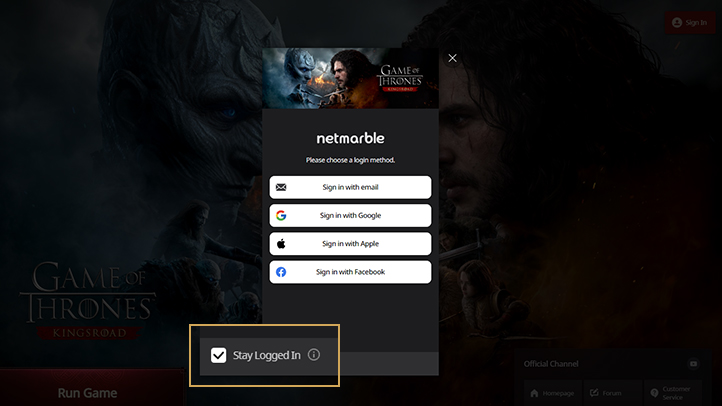
Log in or register on the Netmarble Launcher. If "Stay logged in" is checked, the Netmarble Launcher will be automatically logged in when it is exited and re-launched.

Once logged in, immediately click the "Run Game" button and start enjoying Game of Thrones: Kingsroad!
PC Version System Requirements
Categories
Minimum Specifications
Recommended Specifications
CPU
RAM
Graphic Card
Operating System
Storage Space
Intel Core i5-2500K
AMD FX-8350
AMD FX-8350
16 GB
GeForce GTX 1060 6 GB
AMD Radeon RX 580 8 GB
AMD Radeon RX 580 8 GB
Windows 10 (60-bit)
30 GB / SSD Recommended
Intel Core i7-9700
AMD Ryzen 5 5500
AMD Ryzen 5 5500
16 GB
GeForce GTX 2070 8 GB
AMD Radeon RX 5700 XT
AMD Radeon RX 5700 XT
Windows 10 (60-bit)
30 GB / SSD Recommended
FAQ
Please see below if you have any questions about the PC version.
If you have further inquiries, please contact Customer Service.